SOLIDWORKS DIMXPERT
The SOLIDWORKS DIMXPERT tool that is built into SOLIDWORKS software is primarily used for automating your Geometric dimensioning and Tolerance in 3D Model.
Why DimXpert?
In Engineering, detailing a model is always challenging due to manual dimensioning, which leads to inaccuracies and inconsistencies. Managing geometric tolerances and updating designs manually becomes tedious and leads to potential errors. High complex detail drawing documentation requires more manual efforts without a tool like SOLIDWORKS DIMXPERT.
DIMXPERT
DIMXPERT is a feature in SOLIDWORKS that speeds up the process of dimensioning a 3D model, even if the model is an imported body or has a large number of complicated features. DIMXPERT capabilities quickly define the Size, Location, and Tolerance of the model for manufacturing.

DimXpert Commands like Location, Size, Angle Dimensioning, Pattern, and GD&T are widely used for various purposes and conditions. Altogether Auto Dimension Scheme is widely used for dimensioning the model without manual interventions.
The SOLIDWORKS DIMXPERT tool lets us automatically create dimensions for the entire model with reference to specific datums.
Automatically generate dimensions based on chosen features and dimensioning schemes, and generate dimensions as needed to meet requirements. Update dimensions when part designs change, maintaining consistency between the model and dimensions.
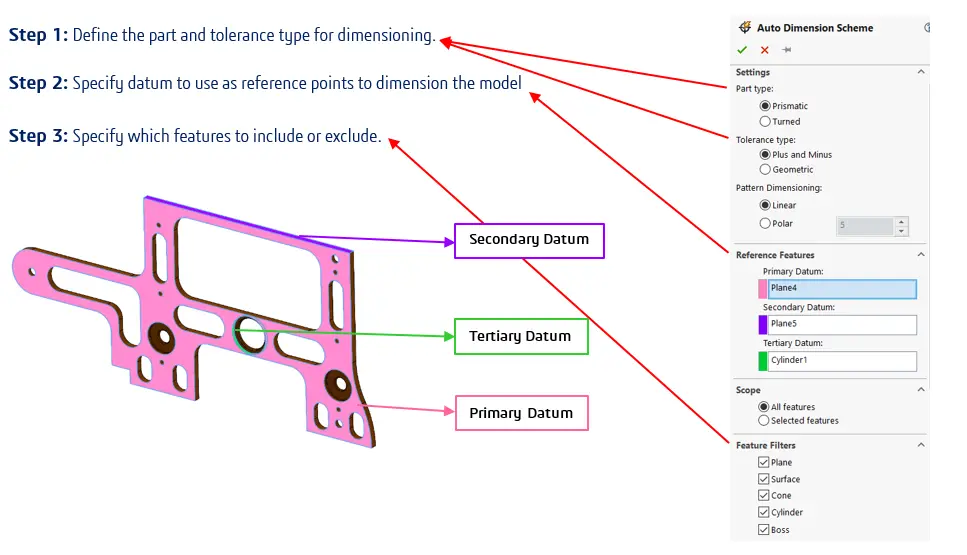
Step 4: After selecting the desired features, click on the “ok.”
Step 5: SOLIDWORKS DIMXPERT will analyze the selected features and automatically add dimensions and tolerances according to predefined rules and settings.
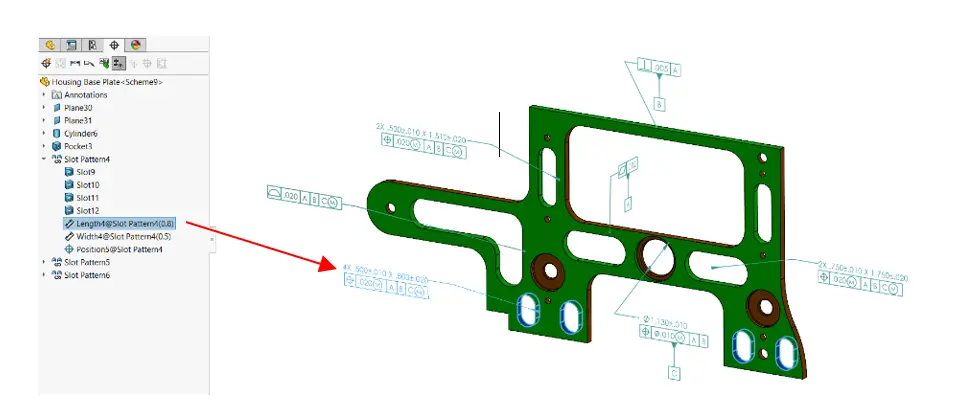
Step 6: Review the automatically generated dimensions and tolerances to ensure they meet your design requirements.
DimXpert Options
Within the DimXpert Document Properties in SOLIDWORKS Settings, you’ll find various settings that control the behavior and appearance of dimensions created with SOLIDWORKS DIMXPERT. Some common properties include:
- Dimension Units
- Tolerance Format
- Precision
- Annotation Font
- Leader Arrow Display
- Arrowhead Style
Automated Dimensioning: Automates the process of adding dimensions to your 3D models. This saves time and reduces errors compared to manual dimensioning.
Associativity: Maintains associativity between the dimensions and the model. If the model changes, SOLIDWORKS DIMXPERT updates the dimensions accordingly, ensuring that your design is preserved.
Standard Compliance: Ensures your designs meet the industry standards for dimensioning, such as ASME Y14.5.
Dimensioning for Manufacturing: Provides the capability of adding dimensions that are crucial for manufacturing processes, such as hole callouts, geometric tolerances, and annotations.
Enhanced Communication: Clear and accurate dimensioning improves communication between designers, engineers, and manufacturers, reducing misunderstandings and errors during production.
Contact Us: Have questions or need assistance? Feel free to reach out!
Email: mktg@egs.co.in
Phone: +91 94454 24704